Wednesday, March 26, 2008

Laptop, External Monitor, and xrandr to the Rescue

I have just upgraded to Ubuntu Gutsy (I know I'm very very late) on my laptop. The installation went fine but when I connected an external monitor with a higher resolution than my laptop has, gdm and GNOME were not able to detect this, and instead displayed the picture in the upper left corner of the screen.

This was especially funny with GNOME, because the desktop actually used the full resolution, and I could move windows over the whole screen. Only the panels were stuck in the middle of the screen.

Apparently I'm not the only one with this problem, so let me tell you what I found out and how to fix this.

Everything was fine with Ubuntu Feisty. When I connected an external monitor, the laptop screen switched off and the higher resolution was used. But now when I connect an external monitor, the laptop screen doesn't switch off automatically.

Because the laptop screen is still on, the system now has two screens and GNOME will automatically adapt to the screen with the lower resolution.

The moment I manually switched off the laptop screen with the tool xrandr

$ xrandr --output LVDS --off

the GNOME panels jumped to their correct position. So let's investigate this xrandr a bit more.

xrandr is a powerful tool for managing multiple video outputs, rotating the screen, and setting up multihead displays.

You can get a list of what the graphics driver thinks it has connected by invoking

$ xrandr -q

This will give you something like this:

Screen 0: minimum 320 x 200, current 1680 x 1050, maximum 1680 x 1200
VGA-0 connected 1680x1050+0+0 (normal left inverted right) 433mm x 271mm
1680x1050 60.0*+ 60.0
1280x1024 75.0 59.9
1440x900 75.0 59.9
1280x960 59.9
1152x864 74.8
1280x720 59.9
1024x768 75.1 60.0
800x600 75.0 60.3
640x480 75.0 60.0
720x400 70.1
LVDS connected (normal left inverted right)
1024x768 60.0 + 60.0
800x600 60.3
640x480 59.9
S-video disconnected (normal left inverted right)

The interesting entries are LVDS (the laptop screen) and VGA-0 (the external monitor). Both are connected. VGA-0 might be called VGA or similar on your system, as this name is driver-dependent.

If I wanted to check if an external monitor was connected, I'd just run

$ xrandr -q | grep "^VGA.* connected"

VGA-0 connected 1280x1024+0+0 (normal left inverted right) 338mm x 270mm

I want the system to switch off the laptop screen whenever an external monitor is connected, so that GNOME will use the higher resolution. This easily can be done by adding the following lines to /etc/gdm/Init/Default just before the

exit 0

line:

xrandr -q | grep "^VGA.* connected" >/dev/null
RC=$?
if [ $RC = 0 ]; then
xrandr --output LVDS --off
fi

It will also make gdm use the full resolution.

Tuesday, February 26, 2008

"Native" PAN support for maemo

maemo in a PAN
The waiting is finally over. There is now support for phone-tethering via the PAN Bluetooth profile, which is so popular on Windows Mobile smartphones.

By "native" I mean that it's quite well built into the system and does not appear as a separate application. And you no longer need a command line or root access for making PAN connections.

After you have installed the maemo-pan add-on (sorry, only OS 2008 supported so far), you can get online with just a few simple steps:
  • Go to the system preferences and add your phone in the phone settings. Do not enter the wizard for configuring the dialup settings. PAN does not use them.

  • Start internet sharing on your phone. It depends on your phone how and where to do this. On Windows Mobile 5, open the Start menu and select "internet connection sharing" from there.

  • Make sure that Bluetooth is enabled on your internet tablet. Now open the connection dialog and you will see that there is a new connection called "Bluetooth-PAN". Select it and you will be connected to the internet via PAN.

  • When you're finished, just close the connection the usual way. Wasn't this easy? :)

Thanks go to aleksandyr for figuring out stuff and to Frantisek Dufka for writing the initial PAN connection shell script for OS 2008. Without you guys maemo-pan wouldn't have happened!

No, MediaBox Media Center is NOT developed by Nokia


Somebody at maemo.org must have thought MediaBox was a Nokia application while tagging some pages. The MediaBox entry on maemo.org/downloads is tagged with "Application developed by NOKIA". This is plain wrong!

No, I am not working for Nokia, and MediaBox Media Center is not related to Nokia in any way.

Thursday, February 21, 2008

MediaBox once again - 0.94.2 this time

Maybe I was too quick releasing MediaBox 0.94.1 yesterday. The config reader bug which could cause hanging during startup was only partially fixed in 0.94.1. So here's release 0.94.2 with even more bug fixes hitting the maemo download servers.

Wednesday, February 20, 2008

MediaBox 0.94.1 fixing a few things

I have just released Version 0.94.1 of the MediaBox Media Center. This is a bugfix release and will help you if you experienced MediaBox 0.94 hanging on startup.

The new version also adds support for non-UTF-8 character encodings in ID3 tags, such as ISO-8859-1 and UTF-16.

Thanks to all users who reported bugs and made suggestions!

Monday, February 11, 2008

MediaBox 0.94 - the New Enhancements and a Big Thank You!

Thank you all for reporting bugs and giving new suggestions for MediaBox Media Center! You help me a lot making this the best and friendliest media center for the tablets! Keep on reporting; you decide what's important!

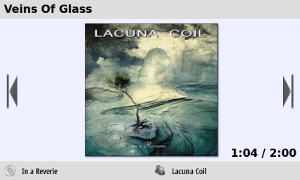
MediaBox Track Info

So here is release 0.94 with a lot of small improvements.

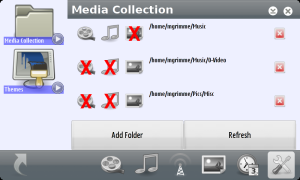
The media scanner will now cache already loaded thumbnails so it will be quicker after you add or remove a media folder. You can also specify for each folder which kind of media you have in there. Thus you will be able to avoid getting all your album cover art listed in the image viewer, for example.

Configuring the media collection

If you've always wanted to play the FM radio through the loudspeakers, you can do so now. MediaBox can finally switch from headphones to loudspeakers when the headphones are plugged in as FM radio antenna. The FM radio is only available on the N800, though.

The button on the Nokia headset is now also supported and you can press it to pause and resume playback.

I have also added a tag parser for FLAC tags and fixed some flaws regarding FLAC playback. FLAC is a free and lossless audio codec for high quality audio.

MediaBox is now powered by player backends for mplayer and the native osso-media-server. By selecting between two backends, more media formats can be played back. This especially adds support for real media and real internet radio streams (.ram), as well as MP4 and 3GP videos.

The new MediaBox release is available from the website as well as through the application manager in the Maemo extras catalogue. The package installs on OS 2006 (video playback not yet supported on the 770), OS 2007, and OS 2008.

Friday, January 25, 2008

MediaBox 0.93 with support for embedded ID3 album art and more

Maybe you have already noticed that there's now MediaBox 0.93 available in the maemo-extras repositories for OS 2007 and OS 2008.

So what's new in this release?

First of all, rendering became a bit faster. Many rendering operations are now directly performed on the X server where they run 2D-hardware-accelerated. Previously, only the kinetic scrolling was done like this. Especially the Nokia 770 gives very smooth results that way.

But much more important, the media scanner became a lot quicker. So if there are no new thumbnails to generate, it will scan your media in almost no time. Together with deferred thumbnail assembling, this greatly speeds up startup time.
The scanner is now also much more robust and knows how to get past bad media files that make mplayer hang during thumbnailing. Oh, and you can now watch the new thumbnails while they are being created.

I have improved the ID3 tag parser as well and it supports ID3 v1, v2.2, v2.3, v2.4 now. If you have album art embedded in your ID3 tags, then chances are good that MediaBox will be able to show it.

MediaBox also runs on the Nokia 770 with OS 2006, but video still does not work reliably there, and there are still some memory issues to be solved. But it's perfectly usable as a photo viewer or for playing music. Of course I'll keep testing MediaBox on the 770 and try to make it work even better.

See the release notes for more.